Ollicle Reflex - NetNewsWire style
A stylesheet for NetNewsWire which optimises your feed reading experience with clean typography, clever CSS and crafty JavaScript.
Download and install
Double-click the unzipped .nnwstyle file – NetNewsWire will copy it to
where it needs to be.
~/Library/Application Support/NetNewsWire/StyleSheets/If you are already using an old version of Ollicle Reflex you will need to restart NetNewsWire for the new version to load.
This style uses JavaScript to do some things CSS alone cannot. Make sure you enable it:
- NetNewsWire Preferences
- Browsing
- News Items
- Enable JavaScript
- News Items
- Browsing
If you haven’t already you can also select Ollicle Reflex from the Style Sheet menu in the same place.
Requirements
This style has been developed and tested on a PowerPC Mac running NetNewsWire 3.2.3 on Mac OS X 10.5.8 (Leopard for the cat fanciers) with Safari 4 (which determines the version of WebKit NetNewsWire is sporting). I’m interested to know how it works for you.
Note: styles for NetNewsWire 3 do not affect the Combined view - only the Traditional and Widescreen views.
Key features
Simple clean style
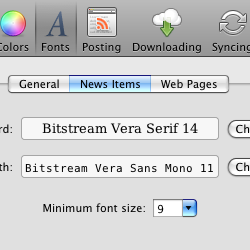
Respects and enforces your choice of fonts in NetNewsWire’s News Item appearance preferences. Distinguishes between layout and data tables and styles them appropriately. Strips out obtrusive inline styles.
Clever image handling
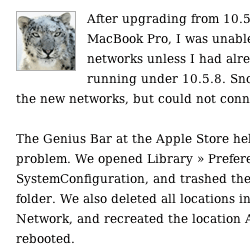
Large images are scaled to fit available width. Smaller images are only floated if the following text still has room. Text and images that clearly belong together stay together.
Automatic line height
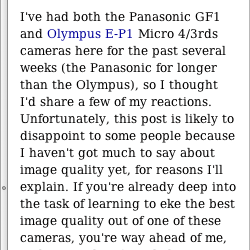
Optimises line spacing of the feed text to suit your window and font size. More about this: Flex CSS with JavaScript for better reading
Friendly fuzzy date
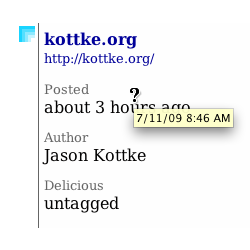
Click to toggle between the date/time of the post and it’s age in human language. Powered by timeago. Thanks Ryan McGeary.
Delicious Tagometer
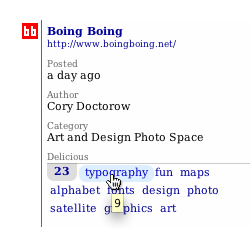
Displays the number of delicious.com bookmarks for the linked webpage along with the most popular assigned tags. Includes a little hackery to see through feedburner and feedproxy urls.
Tidy diff display for recent feed changes
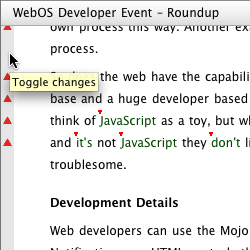
With Highlight Differences checked in NetNewsWires general preferences you can toggle between the current and previous version of a changed feed. Feed changes are highlighted in a vertical bar in the left hand column. Hovering the bar with your cursor highlights additions inline, clicking it hides additions and reveals the deleted content.
Per feed layout and theme prefs
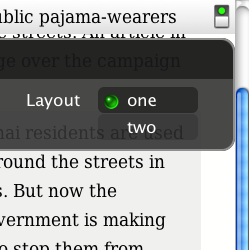
Clicking the little switch in the top right hand corner of the description pane toggles the preference pop-up for your currently viewed feed. NetNewsWire shares cookies with Safari to store your selection of layout or theme for any post from that feed.
A choice of layouts
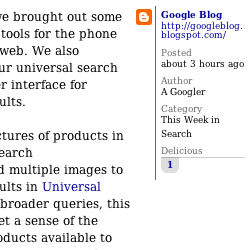
Two column is the default layout with the feed info persistent in the right hand margin or the optional One column, full width, layout with the feed info underneath in the footer. If you prefer you can set the single column option as a global default (see below).
Dark or light theme
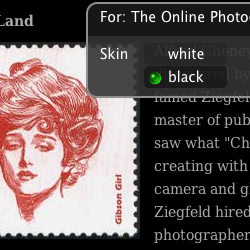
Choose between the default white background or the image enhancing black background. If you prefer you can set the black background option as a global default (see below).
Looks like old news
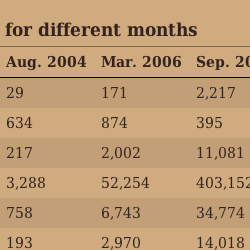
New in version 9 Using the white theme, news items discolour over time to reveal their age at a glance.
Customisable defaults
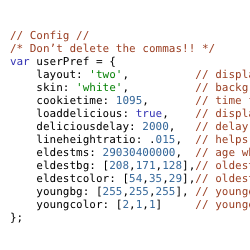
If you don’t like my selection of defaults in Ollicle Reflex I have made a few of the prefences more easily configurable. Now you will need to roll up your sleeves and launch your text editor.
Overriding preferences for every feed
Locate the Ollicle Reflex style package
~/Library/Application Support/NetNewsWire/StyleSheets/Ollicle Reflex.nnwstyleReveal it’s contents by right (or control) clicking it and selecting “Show Package Contents”.
At the top of the contained “javascript.js” you will find values
set within the curly brackets of var userPref = {};. Make sure
you only edit what falls between the colon and the comma, and ensure you leave
the quotes around the layout and skin names. Note the last item
shouldn’t have a trailing comma.
To see your changes take effect it is necessary to relaunch NetNewsWire so it can update it’s cache of the style.
Maybe someday I’ll try my hand at making a small AppleScript app to edit these options in a more friendly manner. If in the meanwhile you manage to break it (the JavaScript elements of the style will stop working), you can always come back here and download the style again.
Blog entries
-
Update entry: Ollice Reflex 9 - it’s about time
-
Update entry: Ollicle Reflex refined for smarter feed reading
-
Update entry: Safari 3 fix for Ollicle Reflex
-
Update entry: Del.icio.us Reflex
ollicle.com entry: Reflex for NetNewsWire
Rough version history
First version of Ollicle Reflex
An evolutionary improvement on Ollicle Flex. Makes use of the wonderful jQuery to help stretch what’s possible in a NewNewsWire style further again. Ollicle Reflex introduced:
- A new preference ‘UI’.
- Optional black background (nice for images).
- Inline feed styles stripped for consistent feed legibility.
- Some small tweaks to the display of images.
- Fixed position news title now only appears when you scroll down the page.
- And improvements to most of what was good in Flex!
Version 4:
- Del.icio.us Tagometer
- Per item Highlight differences deleted content toggle
Version 5:
- Fixed some issues with Safari 3 beta<
Version 6:
- Intelligently positions smaller images.
- Adds customisable layout and background defaults.
- Completely new diff display.
- Scalable pref interface.
- Easier to read data tables.
Version 7:
- Line-height user pref now works.
- Added pref to hide del.icio.us tagometer.
Version 8:
- Respects the layout of consecutive images typical of image galleries.
- Avoids the load ‘jump’ of images that have specified dimensions.
Version 9:
- Image layout bug fixes.
- White theme discolours according to feed item age.
- Friendly relative date and time. (Requires NNW 3.2)
- Design refinements to preference UI and content styling.
- Made two column the default for either NetNewsWire view layout.