Reflex for NetNewsWire
- Posted
28 November 2006 - Updated
10 March 2008
Ollicle Reflex in an evolutionary improvement on my last NetNewsWire style - Ollicle Flex.
This style is designed to maximise legibility rather than add distracting ‘style’ to your feed reading. Those who like a bit of colour and visual impact in their feed reading will appreciate it’s smart handling of full size photographs and comics.
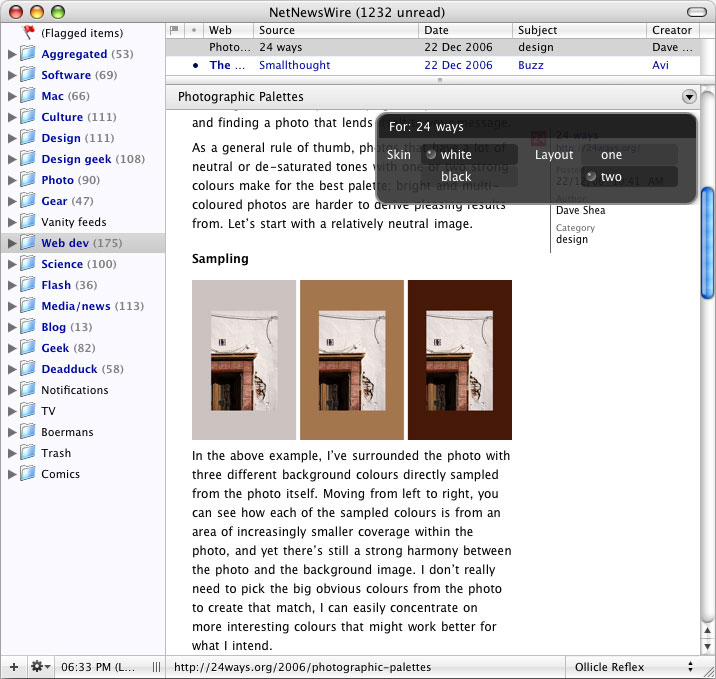 Default white background.
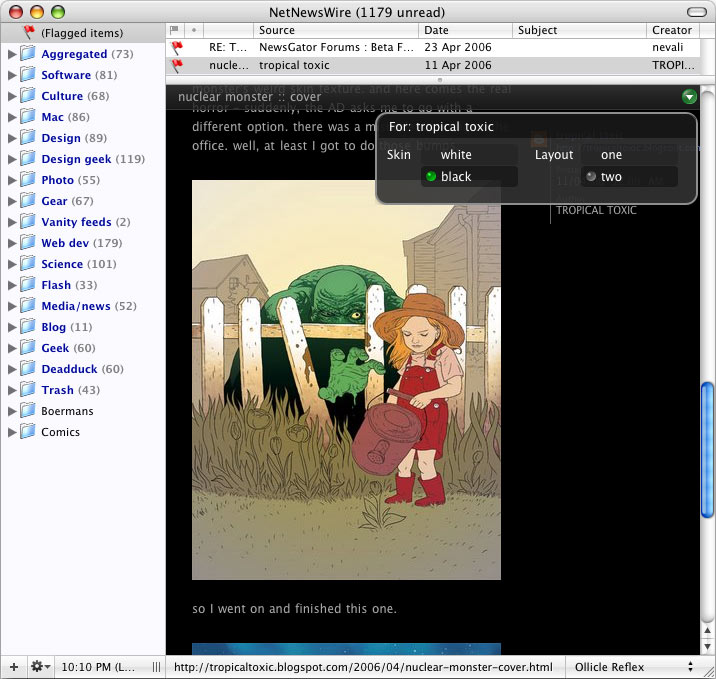 Optional black background.
Download and install (Updated see: Ollicle Reflex refined.)
Download latest version: Ollicle Reflex
I have removed the link to Ollicle Reflex Black. There is a new method. for setting black as the default background.
Double-click the unzipped .nnwstyle file and NetNewsWire will copy it to where it needs to be.
~/Library/Application Support/NetNewsWire/StyleSheets/Like my previous release, this style uses JavaScript to do some things CSS alone cannot. Make sure you enable it
- NetNewsWire Preferences
- Browsing
- News Items
- Enable JavaScript
- News Items
- Browsing
Works great with the full version of NetNewsWire
or lite.
Key features
Carried over from Flex (with improvements!)
- Auto line-height to suit your selection of window layout (the loading ‘jump’ has been minimised).
- Images scale to fit window width (padding related stretching bug fixed).
- Choice of two layouts (selection saved per feed).
- Doesn’t interfere with your choice of font and text size.
Reflex introduces
- A new preference ‘UI’.
- Optional black background (nice for images).
- Inline feed styles stripped for consistent feed legibility.
- Some small tweaks to the display of images.
- Fixed position news title now only appears when you scroll down the page.
Mostly I continue to work on styles for NetNewsWire to please myself. Regardless, I am interested to hear your ideas on improving your reading experience.
Behind the scenes
Timely challenge
Initially one of my big struggles with introducing JavaScript into my NetNewsWire style was controlling when (if at all!) the script would fire. The Flex style does not perform any JavaScript until the content of the feed is loaded completely. I have a pretty quick internet connection, so it was rarely a matter of patience; Rather it was the ‘jump’ after the images loaded that bothered me. At the time the only reliable techniques that worked for Safari/Webkit, that I could find, involved a timed delay to ensure the page would be ready to be manipulated by JavaScript. The text would still noticeably jump when the calculated line-height was applied.
Finding the path
Eventually a solution came to light that worked, but there was a problem applying the method to a NetNewsWire style. The technique relied on the JavaScript being linked into the head of the page as an external file. Simple when you are putting together a web page, but the style template NetNewsWire uses is limited to the contents of the body of the page.
I had a existing script to dynamically add an external file into a page, and it is a no-brainer to drop my JavaScript into its own file inside the .nnwstyle package. The tricky bit was finding the path to this file – the simple relative link doesn’t work and I couldn’t determine the full path without knowing the name of the user directory where the style package lives in advance.
Frustrated potential
The prospect of finding a means to load an external file was tantalising. It could provide a way to load a JavaScript library to make DOM scripting a bit more fun. I don’t enjoy wrestling JavaScript but I love getting things to work. JQuery in particular makes DOM scripting fun and also provided a solution to my initial script launching challenge. Too good to be true? It was until I found a way to load the file in the first place.
Seeing the obvious
It took awhile for my subconscious to get through to me and point to the
answer under my nose. NetNewsWire was already determining the path to an
external file residing in every style package – the CSS file! Two lines of
JavaScript to read the content of the generated style tag and replace
stylesheet.css with javascript.js and the path to
the file was complete.
Until next time
My JavaScript is still a bit of a mess. I have not spent the time to rewrite my code as a showcase of the beauty jQuery can bring. I had to resist a strong temptation to put off sharing the style until I had polished it a little. Release early and often they say – so I figure I’ll release a shiny version next time – one day, maybe.
In the meantime it’s working for me – I hope it works for you!
Further thoughts
29 December 2006
New feature – Black skin default
A significant number of you have politely requested a means to use the black skin by default. So I’ve spent a some of my hard earned holiday time to post a new version (3) of Ollicle Reflex with a trick up it’s sleeve.
You may change the default skin by changing the name of the unzipped file:
- for white use ‘Ollicle Reflex.nnwstyle’
- for black use exactly ‘Ollicle Reflex black.nnwstyle’.
Double-click the file to install it and you’re done!
Note: JavaScript must be enabled for this bit of magic to work – see above.
Also note: if you have a previous version of Reflex installed – installing the new version with the altered name will leave the older version in place. To remove NetNewsWire styles you can delete (or move) them from:
~/Library/Application Support/NewNewsWire/StyleSheets/If you make changes to files directly in this folder you will need to restart NetNewsWire to see the result.
25 April 2007
To thank everyone who spent the time to send me feedback on this style I’ve updated it. The new version fixes a couple of popular problems and introduces some del.icio.us love.
10 March 2008
Another update with a bunch of improvements: Ollicle Reflex refined